If you are looking for an alternative to Yahoo Finance Portfolio, you can easily import your Yahoo Finance Portfolio into EquityStat. Recently, we enhanced our import feature to work with Yahoo portfolios.
To import your Yahoo portfolio into EquityStat, just follow these easy steps.
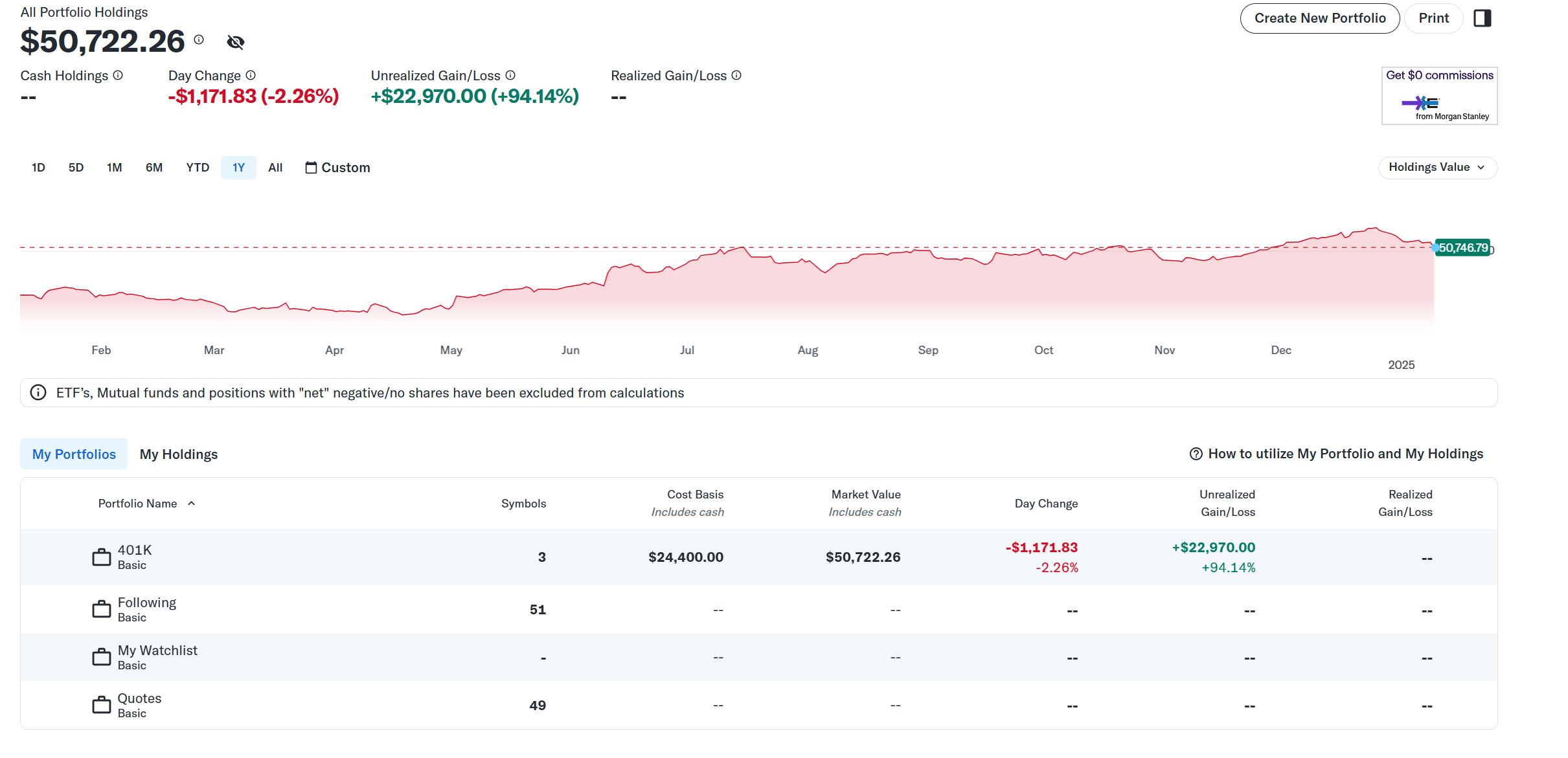
Step #1 Login to your Yahoo Finance Portfolio and click on a portfolio with holdings.
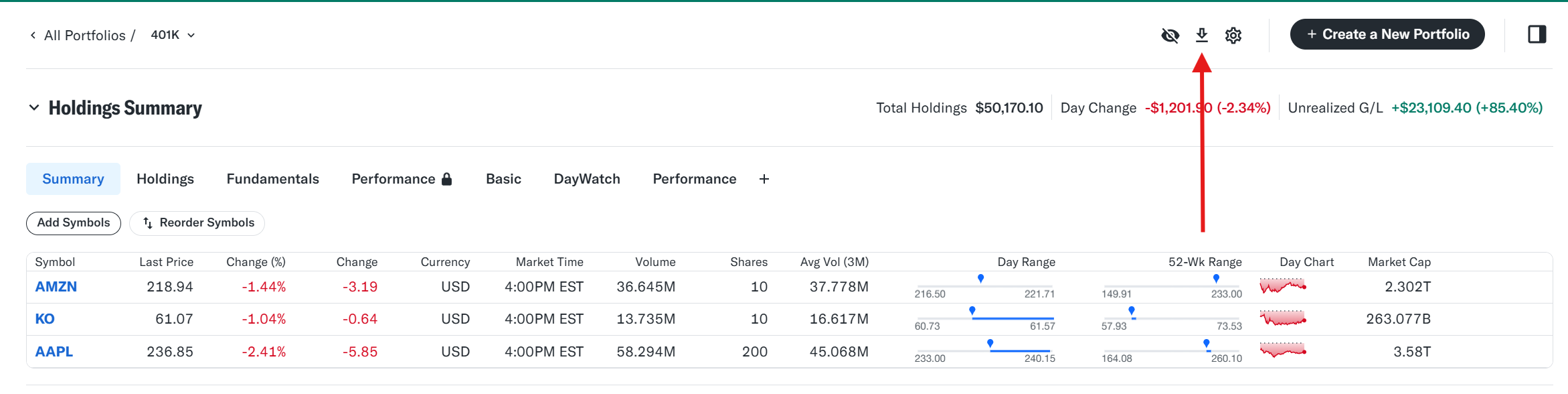
Step #2 On page that displays your holdings, click the down arrow icon in the upper right hand corner.
You will then be prompted to either Print the portfolio or Save the portfolio as a CSV. Choose the Save option. Your CSV file will then be saved to your Downloads folder on your computer.
Step #3 Login to your EquityStat account and click the New menu at the top and choose Import Transactions from the drop down menu. Choose the portfolio you want to import into. Next, choose the file you saved in Step #2.
If you have any questions, contact our support by clicking here.
Many investors today are searching for a reliable alternative for the Yahoo Finance portfolio manager. Over the years, Yahoo Finance has made several changes to its stock tracking tools, changes that have frustrated long‑time users who depend on accurate, fast, and intuitive portfolio tracking. If you’ve been struggling with the Yahoo Finance stock portfolio tracker, you are not alone. Thousands of investors are looking for a better solution.
That’s exactly where EquityStat stands out.
EquityStat was built by investors, for investors. Our goal has always been to create a powerful, clean, and easy‑to‑use portfolio manager that gives you more control, more data, and a better overall experience than Yahoo Finance.
EquityStat was founded by investors. As investors we understand what other investors are looking for in a portfolio manager. For example, one of our goals was to make EquityStat’s Portfolio manager show as much information on your screen without you having to constantly scroll around to see your data. Unlike Yahoo, EquityStat does not show ads, so this gives us more room to show more information about your investments and how they are performing.
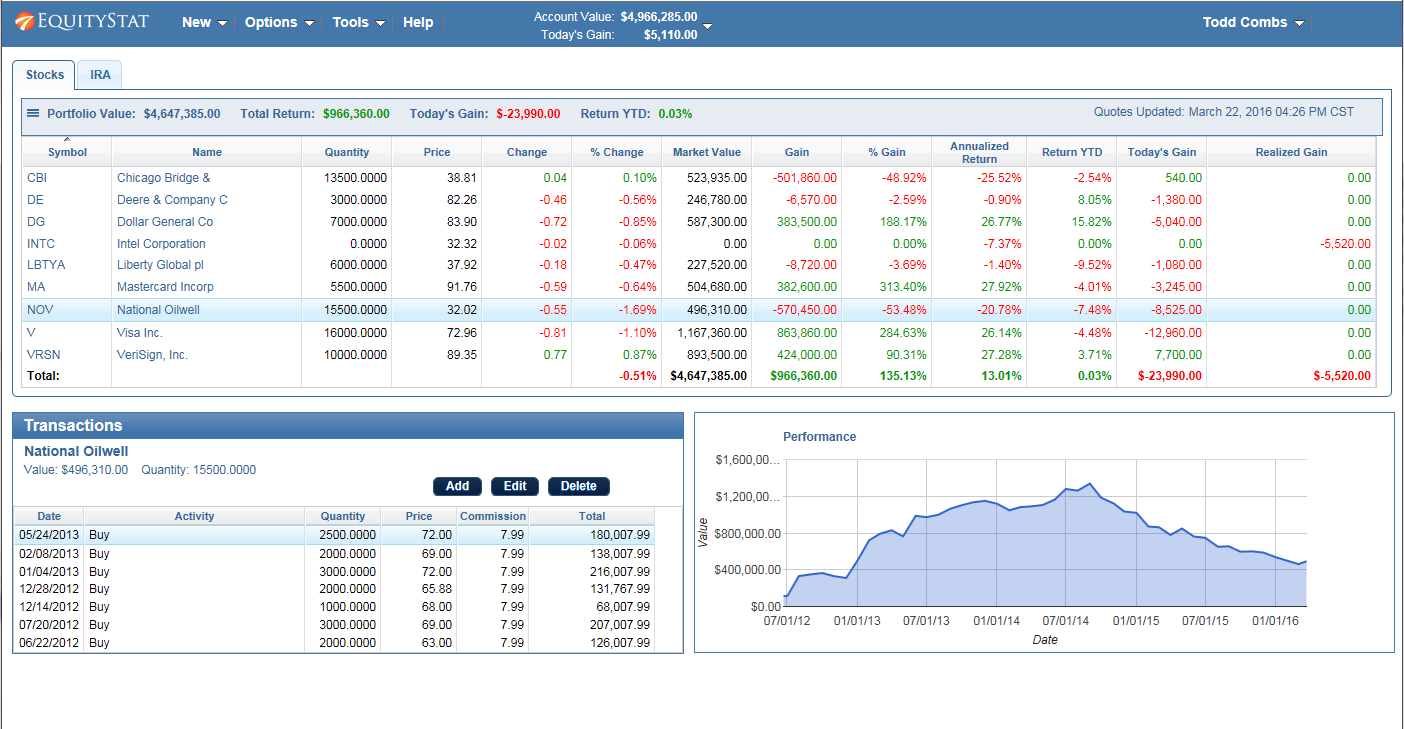
Stock Portfolio Example
Why Investors Are Moving Away from the Yahoo Finance Portfolio Manager
The Yahoo Finance portfolio manager has historically been popular, but recent updates have made the tool less efficient for serious investors. Common complaints include:
Cluttered screens filled with ads
Slow loading times
Missing or removed features
Limited customization
Reduced visibility of important data
For investors who track multiple stocks, ETFs, mutual funds, or long‑term positions, these limitations can make daily portfolio management frustrating.
This is why so many users are actively searching for a better Yahoo Finance stock portfolio tracker alternative—and discovering EquityStat.
EquityStat: A Better, Smarter Stock Portfolio Tracker
EquityStat’s portfolio manager was designed to solve the problems investors face with Yahoo Finance. Instead of ads, clutter, and limited data, EquityStat focuses on clarity, speed, and usability.
1. A Clean, Ad‑Free Interface
Unlike the Yahoo Finance portfolio manager, EquityStat does not display ads. This gives you more screen space, faster load times, and a cleaner view of your investments.
2. More Data on Your Screen
One of the biggest complaints about Yahoo Finance is how much scrolling is required to see your full portfolio. EquityStat solves this by displaying more information at once, allowing you to analyze your holdings without constantly moving around the page.
3. Built by Investors Who Understand Your Needs
EquityStat was created by people who actively invest. We know what matters:
Clear performance metrics
Easy navigation
Fast updates
Accurate data
Customizable portfolio columns
Every feature is designed to help you make smarter investment decisions.
4. A Better Long‑Term Portfolio Tracking Experience
EquityStat gives you the tools you need to track performance over time, monitor gains and losses, and understand how your investments are performing, without the limitations of the Yahoo Finance stock portfolio tracker.
We Want to Improve Even More — Tell Us What You Need
If there is a feature you liked in the Yahoo Finance portfolio manager that EquityStat does not yet include, we want to hear about it. Our development roadmap is driven by user feedback, and we take every suggestion seriously.
Our mission is simple: Build the best stock portfolio tracker for investors who want accuracy, clarity, and control.
Try EquityStat Today — A Better Alternative to Yahoo Finance
If you’re looking for a powerful, clean, and reliable replacement for the Yahoo Finance stock portfolio tracker, EquityStat is ready for you. Experience a portfolio manager that actually works the way investors need it to.
Yahoo Finance Has Changed Its Stock Portfolio Tracker
Yahoo Finance recently updated its stock portfolio tracker, and many long‑time users are finding the new version harder to use or missing key features. If you relied on Yahoo Finance to track your stocks, ETFs, or mutual funds, EquityStat offers a powerful, easy‑to‑use alternative with more flexibility and better performance tracking.
Why Many Investors Are Looking for a Yahoo Finance Alternative
Yahoo Finance’s portfolio manager was once one of the most popular online tools for tracking investments. But recent changes have removed features, altered layouts, and made the interface less intuitive for many users.
If you’re searching for a replacement that feels familiar but offers more control, EquityStat is designed for exactly that.
EquityStat: A Modern, Feature‑Rich Alternative to Yahoo Finance Portfolio Tracker
EquityStat includes many of the same features Yahoo Finance users expect, plus several advanced tools Yahoo does not offer.
Core Features Similar to Yahoo Finance
Track stocks, ETFs, and mutual funds
View current portfolio value
Monitor daily gain/loss
See percentage gain since purchase
Review realized gains
Access full transaction history
View your portfolio on a previous date
These features make the transition from Yahoo Finance smooth and familiar.
Features EquityStat Offers That Yahoo Finance Investment Portfolio Does Not
EquityStat includes several powerful tools that go beyond Yahoo’s capabilities:
1. Clear, At‑a‑Glance Portfolio Performance
At the top of your dashboard, you immediately see:
Total portfolio value
Total return
Today’s gain/loss
No extra clicks. No digging through menus.
2. Create Multiple Portfolios
Organize your investments into separate portfolios such as:
Personal brokerage
401(k) or IRA
Joint accounts
Taxable vs. tax‑advantaged accounts
Track each portfolio individually or view your entire account’s performance.
3. Less Scrolling, More Data
EquityStat automatically adjusts to your screen size, making it easier to view all your data without endless scrolling, something Yahoo’s layout struggles with.
4. Detailed Performance Calculations
For each investment, portfolio, and your overall account, you can view:
Current market value
Total gain
Today’s gain
Annualized return
Cost basis
And more
These metrics help you understand exactly how your investments are performing.
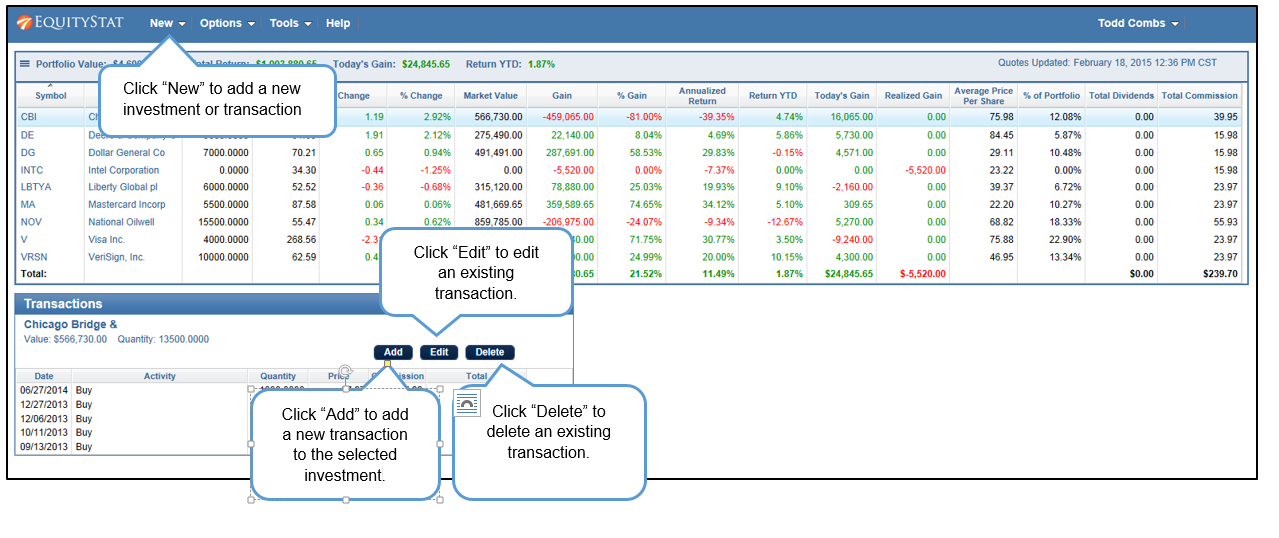
5. Full Transaction Management
For each investment, you can easily:
View all transactions
Add new transactions
Edit existing entries
Delete incorrect entries
Everything is grouped neatly for fast access.
6. Hide or Show Sold Investments
Toggle between:
A clean view of current holdings, or
A full historical view including sold positions
Perfect for tax planning and performance review.
7. Customize Your Portfolio Columns
Add or remove data columns such as:
Return YTD
Annualized Return
Dividend yield
Market value
Cost Basis
Build the exact view you want, something Yahoo Finance does not allow.
8. Import Your Data Easily
Upload your transactions using:
A spreadsheet
A CSV file
No need to re‑enter years of history manually.
9. Generate IRS Tax Forms
If you sold investments, EquityStat can generate IRS Form 8949, which tax preparers use to calculate capital gains. Yahoo Finance does not offer this.
10. Export Your Data for Safekeeping
Download your transactions to a spreadsheet for backup or offline analysis.
11. 24/7 Support
Have a question? EquityStat’s support team is available 24 hours a day, 7 days a week.
12. Works on Any Device
Because EquityStat is built with modern web technology, you can access your portfolio on:
If you haven’t heard, Yahoo’s investment portfolio manager will no longer be supporting transactions. This means that if you want to record all of your buys, sells, dividends, etc., you can no longer do so with Yahoo’s investment portfolio. In other words, you can no longer track the history of your investments. Without a transaction history you cannot get an accurate performance return of your investment and you can’t calculate your gains and losses for your taxes. If you are a user of Yahoo’s portfolio manager and want an alternative, consider EquityStat’s portfolio manager.
With EquityStat you can easily add, edit and delete your investment transactions. You can also easily view your transactions for each investment. In addition you can import these transactions into your portfolio by either manually entering them or importing them from a spreadsheet. If you want to save your transactions to your computer, you can export the transactions for each investment to a spreadsheet.
If you are looking for portfolio manager that supports transactions, checkout EquityStat.