Monster Beverage Is Splitting 2-for-1 on Aug. 11

Monster Beverage (NASDAQ: MNST) is splitting its stock 2-for-1, with shares beginning to trade at their new, split-adjusted price on August 11, 2026. Shareholders of record as of July 24 will see the additional shares credited to their accounts after the market closes on August 10. It is not the company’s first split. Monster’s share price has climbed substantially over the years, and splits like this one are typically how a company keeps its per-share price more accessible as growth continues.

What the Split Actually Means for Shareholders

A 2-for-1 split doubles your share count and roughly halves the price per share, but it does not change the total value of your position. If you owned 100 shares of Monster before the split, you’ll own 200 shares afterward, at approximately half the per-share price. Your overall stake in the company is unchanged, only the number of shares and the price tag on each one are different.

Why You Still Need to Record It

Even though a split does not change what your position is worth, it does change your share count and your cost basis per share going forward. If a split is not recorded in your stock portfolio tracker, your holdings will show the wrong number of shares and an inflated cost basis, which throws off both your ongoing performance numbers and your eventual capital gains calculations when you sell.

How to Record the Split in EquityStat

Recording a split in EquityStat takes just a few steps – select the stock, add a new transaction, choose Split as the activity type, and enter the split ratio, 2 for 1 in Monster’s case. EquityStat then automatically adjusts your share count and cost basis for every prior transaction on that stock.

For the full walkthrough with screenshots, see our guide on how to record a stock split in EquityStat, which covers the exact steps using Tesla’s split as a worked example. The same process applies to Monster Beverage, or any other stock split, regardless of the ratio.

EquityStat and Taxes

It’s that dreaded time of year – tax time. EquityStat’s portfolio manager has several tools to help investors with their taxes.

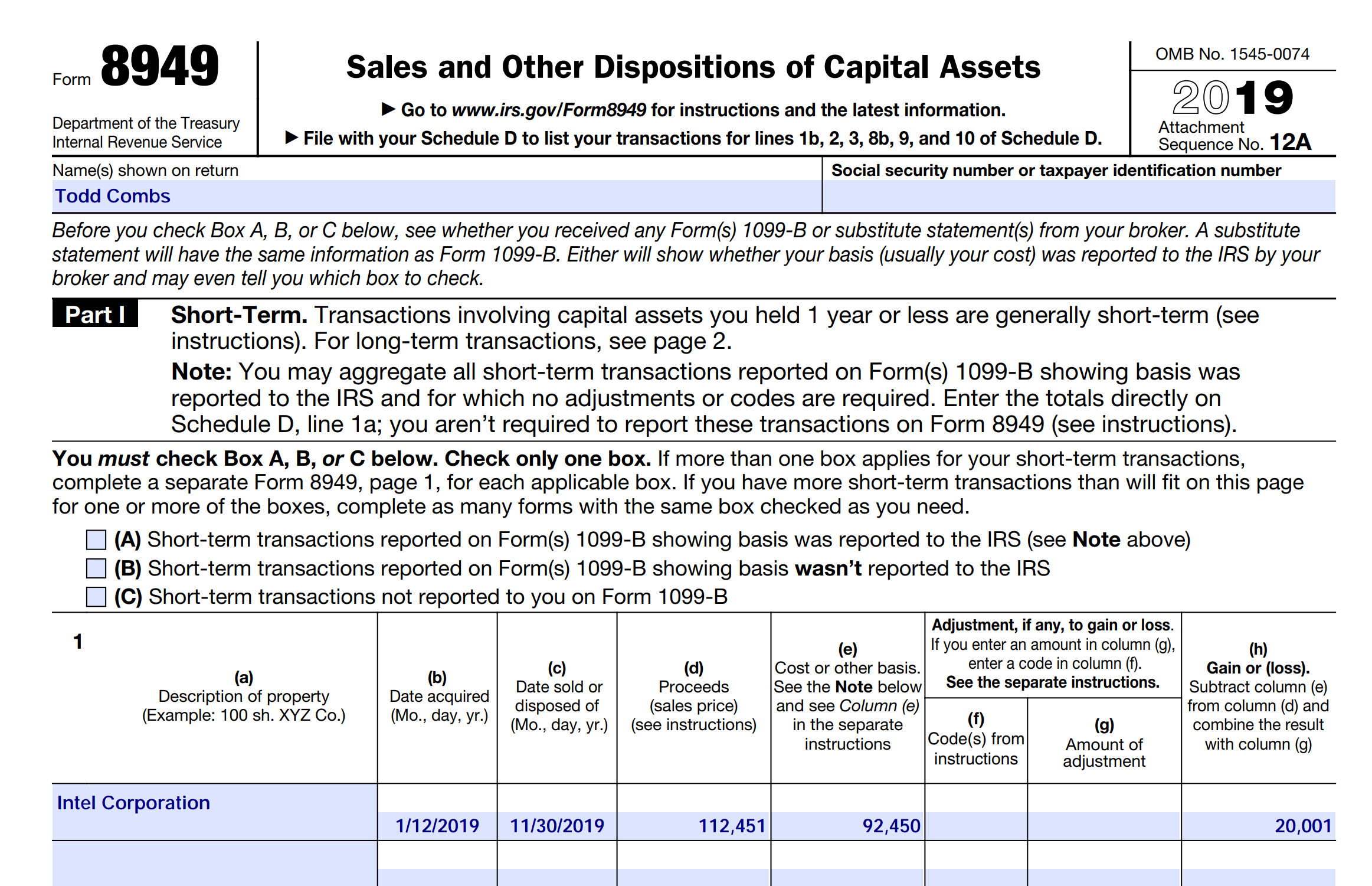
If you sold any shares last year, you can use EquityStat to generate IRS Form 8949.  IRS Form 8949 is a form that shows your short-term  and long-term capital gains on any investment sale.  EquityStat will automatically calculate these capital gains.  It will then generate a PDF of Form 8949 with all needed information that the IRS requires.  You can then give this form to your tax preparer when you are preparing your taxes.  To generate IRS Form 8949, click the Tools menu and then choose the Generate Form 8949 menuitem.

Use EquityStat To Print IRS Form 8949
IRS Form 8949 Example

Another tool to help you with your taxes is the ability to export your investment’s transactions to a spreadsheet. To export your transactions, click the Tools menu and then choose the Export Transactions menuitem. When you export your transactions, you will get a spreadsheet showing each transaction for the investment including the type of transaction it is (e.g. Buy, Sell, Dividend, etc). With this information, your tax preparer can calculate your taxable capital-gains and taxable dividends for all of your investments.

What Is Cost Basis? A Complete Guide for Stock Investors

Cost basis is the original value of an investment for tax purposes, and it is one of the most important numbers you need to know as an investor. If you have ever wondered why your accountant asks for purchase prices and dates when you sell a stock, cost basis is the reason. Get it wrong and you could end up overpaying or underpaying the IRS.

What Is Cost Basis?

Investopedia defines cost basis as the original value of an asset, usually the purchase price, adjusted for stock splits, dividends, and return of capital distributions. That adjusted number is what the IRS compares against your sale price to figure out your capital gain or loss.

In plain terms, cost basis answers one question. How much did this investment actually cost you, once every purchase, split, and reinvestment is factored in?

Why Cost Basis Matters

The IRS requires brokers to report the cost basis on many types of investments, and you are responsible for reporting your capital gains and losses accurately on your tax return. You cannot calculate a capital gain or loss without first knowing your cost basis, so this number sits at the center of your entire tax picture for the year.

But cost basis is not only a tax number. It is also the foundation for calculating your actual return on an investment. Your return measures what you gained or lost relative to what you truly put in, and that starting point is your cost basis. Without an accurate cost basis, your return numbers will be off too, sometimes by a lot, especially once splits and reinvested dividends are in the mix.

Get your cost basis wrong and the consequences go both ways. Report it too low and you will pay more tax than you owe. Report it too high and you risk an audit down the road. Also, if your cost basis is inaccurate anywhere in your portfolio, your return calculations will quietly be wrong as well, which can lead you to misjudge how a stock is actually performing.

How to Calculate Cost Basis

Calculating cost basis looks simple at first. If you buy 100 shares of a company for $120, your cost basis is $120.

Once real life gets involved the calculation gets more complex. What happens if that stock does a 3 for 2 split? What if you buy another 50 shares a few months later at a different price? What if you reinvest capital gains distributions in the same year you also have a split and a new purchase? Each of those events changes your cost basis, and by the time you have a few years of purchases, splits, and reinvested dividends stacked on top of each other, doing this math by hand becomes genuinely difficult and easy to get wrong.

This is exactly the kind of calculation where a small tracking error early on can throw off both your tax numbers and your return numbers.

How EquityStat Makes Cost Basis Easier

EquityStat handles this calculation for you. Enter your purchases, stock splits, and capital gains as they happen, and EquityStat keeps a running, accurate cost basis for every holding in your portfolio automatically.

The same applies to dividends. EquityStat lets you record dividend transactions, including short term capital gains and long term capital gains, and it tracks reinvested dividends and reinvested capital gains separately so those re-investments are properly calculated into your cost basis.

Since EquityStat keeps this number accurate, it also uses your cost basis to calculate your investment return, giving you a true picture of how each holding is actually performing, not just an estimate based on your original purchase price.

When you are ready to sell, whether you are selling your entire position or just part of it, EquityStat calculates your gain or loss instantly. From there, you can generate IRS Form 8949, showing the cost basis for every investment you sold during the year, ready for tax season.

If you are tired of reconstructing your cost basis from old statements every April, tracking it as you go is the easier path, and it is exactly what EquityStat is built to do.
Investments, Taxes, Form 8949, Schedule D

Selling Investments and the IRS

The IRS is requiring more reporting when you sell your investments.  Specifically, they require you to report the investment cost, cost basis in investment terminology, and the gain/loss from the investment sale.  If you purchase 100 shares of a stock and sell 100 shares of the stock, your cost basis is easy to calculate.  Things get more difficult when you purchase shares in different lots.  For example, you purchase 100 shares in 2011, 50 shares in 2012, 200 shares in 2013 and sell 160 shares in 2014.

Form 8949

What is your cost basis in the above scenario?  This is not an easy calculation to do.  To make things even more difficult, you have to report both your short term gains and long term gains to the IRS separately.  Fortunately, EquityStat makes this easy.  EquityStat calculates your cost basis for each investment and can also generate IRS Form 8949 which is a report that shows your gain/loss on each investment sold.  Your tax preparer can then use Form 8949 to create the IRS Schedule D form.

To Generate Form 8949, click the Tools menu at the top of the portfolio and then click the Generate IRS Form 8949. Choose your tax year and EquityStat will generate the report showing both your short term and long term gain/loss on each investment you sold during the tax year.