This stock portfolio tracker FAQ covers the five questions EquityStat users ask most often, from adding your first investment to selling shares and customizing how your portfolio is displayed. Whether you are just getting started or have been tracking your investments for a while, these answers should help you get more out of the tool.
1. How Do I Add a New Investment?
Click the New menu, then choose New Investment from the dropdown. A popup dialog will appear where you can enter the details of your new investment, including the symbol, the number of shares, and the price. Once you save it, the investment is added to your portfolio and its price will begin updating automatically.
2. How Do I Add or Remove a Portfolio Column?
Click the Options menu, then choose Change Columns from the dropdown. The Change Columns panel will appear with two lists, Available Columns and Displayed Columns. To add a column, select it from the Available Columns list and click Add to move it into the Displayed Columns list. To remove a column, select it from the Displayed Columns list and click Remove. When you are finished, click Change to save your new column layout.
This is useful for tailoring your portfolio view to whatever matters most to you, whether that is dividend yield, annualized return, or cost basis.
3. How Do I Change the Order of the Displayed Columns?
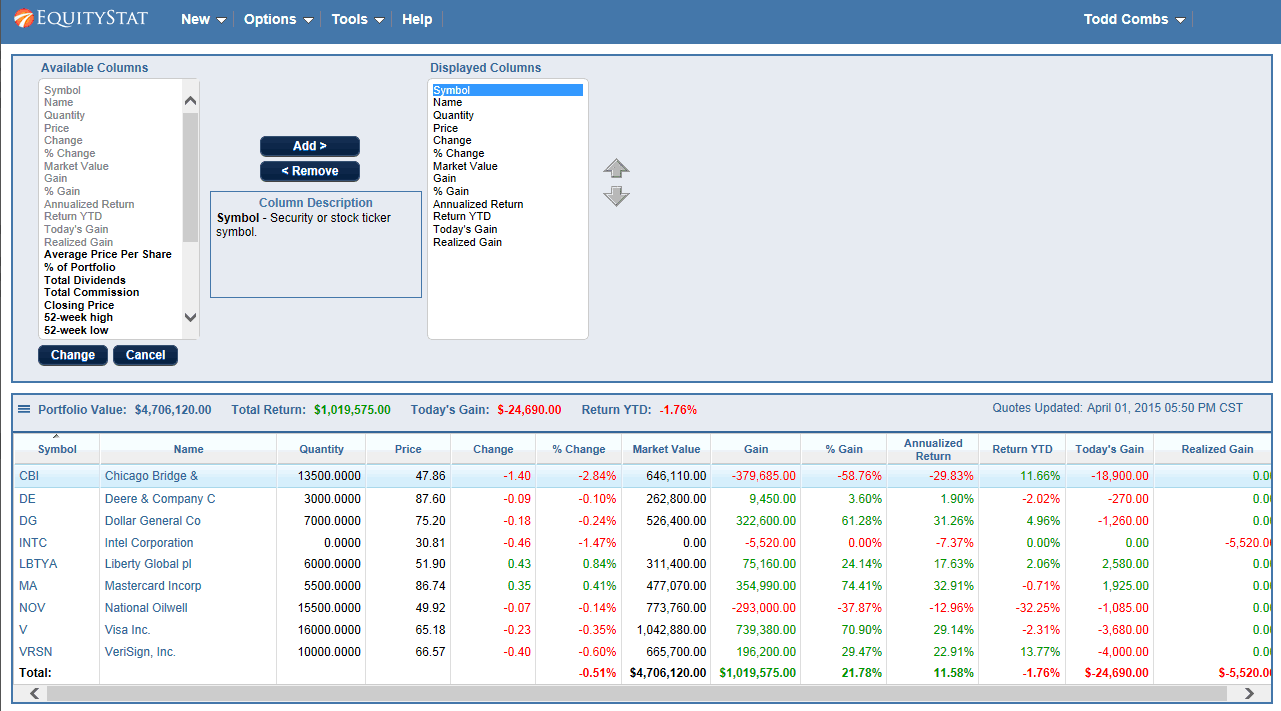
Click the Options menu and choose Change Columns, the same panel used to add or remove columns. Select the column you want to move from the Displayed Columns list, then use the up and down arrows on the right side of the panel to reposition it. Click Change when you are done to save the new order. This lets you put the metrics you check most often, such as gain or current value, right where you will see them first.
4. How Do I Sort My Portfolio by Investment Name or Any Other Column?
To sort your portfolio by investment name, click the Name column heading. The same works for any other column, including Market Value, Gain, or Return. Clicking a column heading once sorts it, and clicking it again toggles between ascending and descending order, so you can quickly see your biggest winners, your biggest losers, or your largest positions.
5. How Do I Sell an Investment?
To sell an investment, add a Sell transaction. First, select the investment you want to sell, then click the Add button in the Transactions section. A popup panel will appear where you can enter the date, choose Sell from the Activity dropdown, and enter the number of shares sold along with the price. Click Add to save your changes, and EquityStat will update your holdings and performance numbers to reflect the sale.
Still Have Questions
If this stock portfolio tracker FAQ did not answer what you were looking for, reach out through the help page for more support.