Monster Beverage Is Splitting 2-for-1 on Aug. 11

Monster Beverage (NASDAQ: MNST) is splitting its stock 2-for-1, with shares beginning to trade at their new, split-adjusted price on August 11, 2026. Shareholders of record as of July 24 will see the additional shares credited to their accounts after the market closes on August 10. It is not the company’s first split. Monster’s share price has climbed substantially over the years, and splits like this one are typically how a company keeps its per-share price more accessible as growth continues.

What the Split Actually Means for Shareholders

A 2-for-1 split doubles your share count and roughly halves the price per share, but it does not change the total value of your position. If you owned 100 shares of Monster before the split, you’ll own 200 shares afterward, at approximately half the per-share price. Your overall stake in the company is unchanged, only the number of shares and the price tag on each one are different.

Why You Still Need to Record It

Even though a split does not change what your position is worth, it does change your share count and your cost basis per share going forward. If a split is not recorded in your stock portfolio tracker, your holdings will show the wrong number of shares and an inflated cost basis, which throws off both your ongoing performance numbers and your eventual capital gains calculations when you sell.

How to Record the Split in EquityStat

Recording a split in EquityStat takes just a few steps – select the stock, add a new transaction, choose Split as the activity type, and enter the split ratio, 2 for 1 in Monster’s case. EquityStat then automatically adjusts your share count and cost basis for every prior transaction on that stock.

For the full walkthrough with screenshots, see our guide on how to record a stock split in EquityStat, which covers the exact steps using Tesla’s split as a worked example. The same process applies to Monster Beverage, or any other stock split, regardless of the ratio.
Splitting a Stock in EquityStat

Amazon’s (AMZN) stock recently split. It was a 20 for 1 stock split. So, for each share you owned before the split, you got 20 shares.

If you owned Amazon (AMZN) stock before the split and you are tracking this stock in your EquityStat portfolio, how do you record the split?

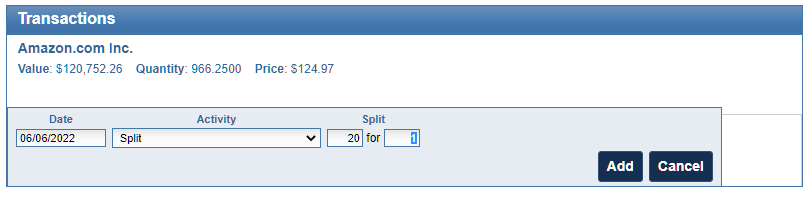
First, select the Amazon stock in your investment panel. Next, in the transaction panel, click the Add button to add a new transaction. In the Activity drop down, choose a “Split” transaction. Enter how many shares were split, in this case it is a 20 for 1 split, and click the Add button to save the transaction.

Add a split transaction in EquityStat's investment portfolio tracker.
Adding a split transaction in your EquityStat portfolio

When the split transaction is saved, each transaction will be adjusted to reflect this split. The number of shares will be increased twenty times and the price will be divided by twenty.

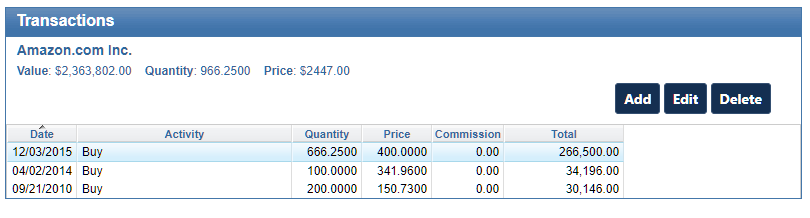
For example, if you had the following transactions before the split.

EquityStat transactions for Amazon (AMZN) before the 20 for 1 split
Amazon transactions before the split

After the split your transactions will look like this.

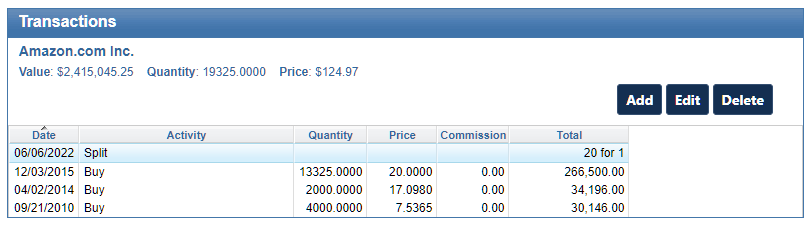
EquityStat transactions for Amazon (AMZN) after the 20 for 1 split
Amazon transactions after the split

Notice that before the split there were three buy transactions. After the split, the number of shares has increased 20 times and the price has been reduced by a factor of twenty. For example, the initial buy on 4/02/2014 was for a quantity of 100 shares. After the split, the purchased quantity is 2000 shares. The price the shares were bought on 4/02/2014 was $341.96. After the split, the price paid was $17.098. These adjustments are all automatically done when you enter the split transaction.

If you have other stocks that have split, you can use the same steps to record your split. Just make sure that you enter the correct split information.