Stock splits change the number of shares you hold and the price you paid for them, without changing the actual value of your investment. If you don’t record a split correctly in your stock portfolio tracker, your share count and cost basis will be wrong going forward, which throws off both your performance numbers and your eventual capital gains calculations. This guide walks through exactly how to record a split in EquityStat, using Tesla’s (TSLA) August 2022 3-for-1 split as a real example.
Why Recording a Split Correctly Matters
When a stock splits, your share count and price per share both change, but your total position value stays the same. Most splits, like Tesla’s, increase your share count and lower the price per share. A reverse split works the other way, decreasing your share count and raising the price per share. Tesla’s split was a 3-for-1 split, meaning for every share you owned before the split, you owned three afterward. If a split isn’t recorded, your portfolio will show the wrong share count and an inflated cost basis per share, both of which affect your reported gains or losses when you eventually sell.
How to Record a Split in EquityStat
- Select the stock in your investment panel.
- In the transaction panel, click Add to create a new transaction.
- In the Activity dropdown, choose Split.
- Enter the split ratio. For Tesla’s split, that’s 3 for 1.
- Click Add to save the transaction.
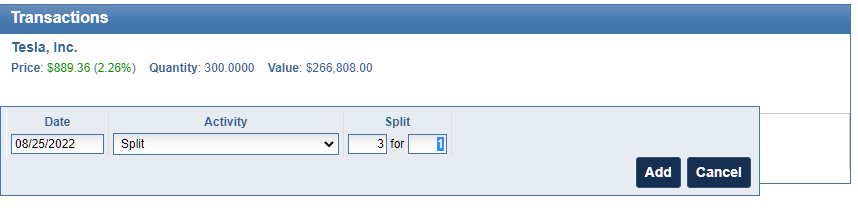
Once the split transaction is saved, EquityStat automatically adjusts every prior transaction for that stock to reflect the split. Share counts are multiplied and the price paid per share is divided accordingly, so your cost basis stays accurate without any manual recalculation.
A Real Example: Tesla’s 3-for-1 Split
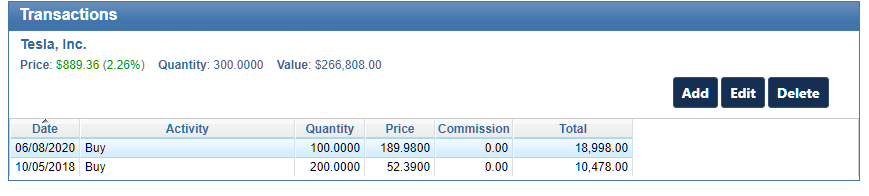
Here’s what a set of Tesla transactions looked like before the split was recorded.
And here’s the same set of transactions immediately after entering the split.
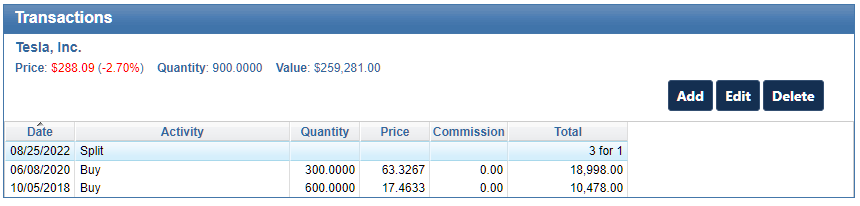
Notice the initial buy on 10/25/2018 was originally for 200 shares at $52.39 per share. After the split, that same transaction shows 600 shares at $17.46 per share, three times the shares at one-third the price. The total dollar value of the position is unchanged; only the share count and per-share price are adjusted.
Recording Splits for Other Stocks
These same steps work for any stock split, not just Tesla’s. Whenever a company you hold announces a split, select the correct stock, add a Split transaction, and enter that company’s specific split ratio (2-for-1, 3-for-1, 4-for-1, or any other ratio). EquityStat handles the share and price adjustments automatically once the ratio is entered correctly.
Frequently Asked Questions
Do I need to update my cost basis manually after a stock split? No. Once you enter the split transaction with the correct ratio, EquityStat automatically recalculates the share count and price paid for every prior transaction on that stock.
What split ratio was Tesla’s 2022 stock split? Tesla’s August 2022 split was a 3-for-1 split, meaning shareholders received two additional shares for every share they owned.
Does a stock split affect my capital gains taxes? No. A stock split changes your share count and cost basis per share, but not the total value of your position or your actual gain or loss when you eventually sell.