Customizing your portfolio columns is one of the easiest ways to make your investment tracking work the way you want it to. Instead of scrolling past numbers you do not care about, you can set up your view so the metrics that matter most to you are in front of you every time you log in.
Why Portfolio Columns Matter
When you first set up an account, EquityStat shows a default set of columns for your portfolio. That default view works fine for most people getting started, but every investor cares about different things. Some people want to keep a close eye on gain and loss. Others are more focused on dividend income, cost basis, or how a position compares to the overall market. Being able to change your columns means your portfolio page can be built around your own strategy instead of a one size fits all layout.
How to Change Your Portfolio Columns
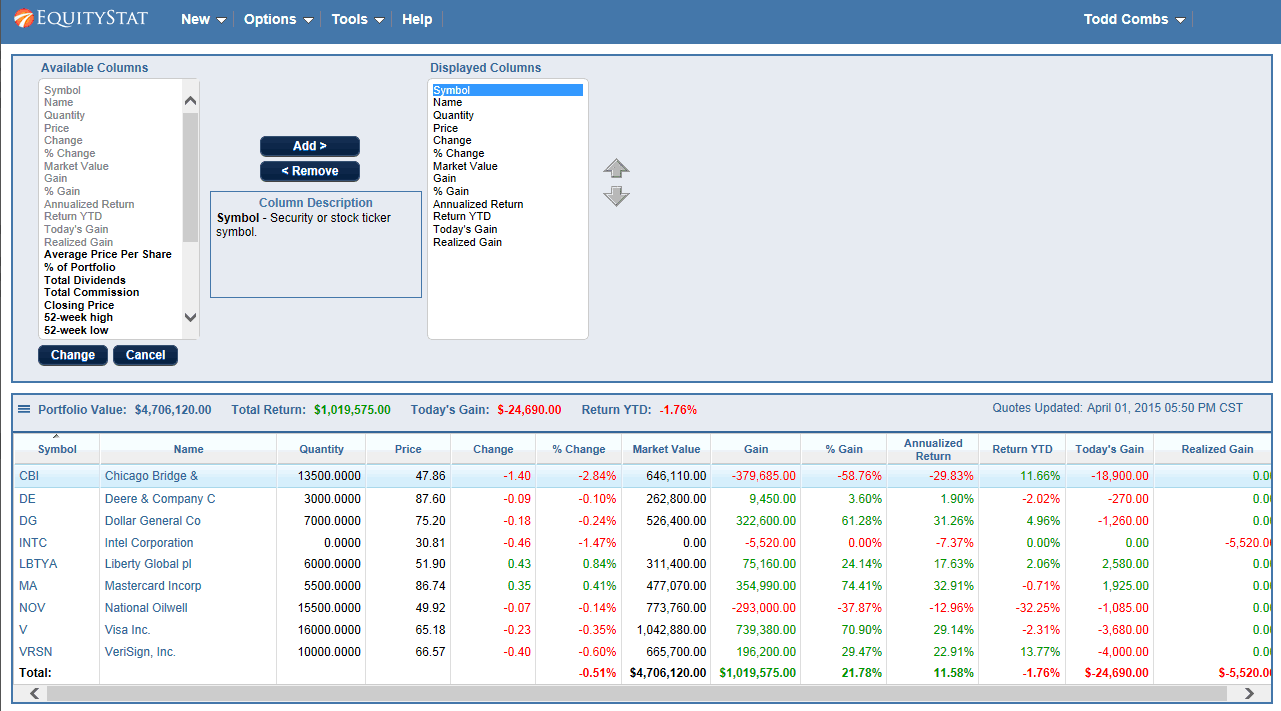
Adjusting your columns only takes a minute, and you will not need to touch any settings outside of your portfolio view.
- Open your portfolio and click the Options link at the top of the page.
- Choose Change Columns from the drop down menu.
- You will see two lists, a list of Available Columns and a list of Displayed Columns. The Available column list is a list of column metrics you can add to your portfolio and the Displayed column list is a list of column metrics that are currently displayed.
- Use the lists to add columns you want, remove ones you do not need, and reorder them so the most important data sits where you will see it first.
- If you are not sure what a column represents, click on it and a short description will display between the two lists.
- Once you are happy with your setup, click Change to save your new column layout and return to your portfolio.
That is really all there is to it. You can come back and adjust your columns again at any time, so there is no need to get it perfect on the first try.
Getting the Most Out of a Custom View
A little bit of trial and error goes a long way here. If you are someone who reinvests dividends, you may want columns that make it easy to see dividend activity at a glance. If you are more focused on long term growth, you might prioritize columns tied to overall performance and cost basis instead. Because you can rearrange columns whenever you like, it is worth revisiting your setup every few months as your investing goals shift.
Final Thoughts
Taking a few minutes to set up your portfolio columns can make checking your investments a much faster and more useful habit. Rather than digging through numbers you never look at, you get a view built around what actually matters to your strategy. If you have not customized your columns yet, log into your EquityStat account and give it a try.