EquityStat’s investment symbol search makes adding a new stock, ETF, or mutual fund to your portfolio faster and easier than ever. In the past, adding an investment meant you needed to already know its exact ticker symbol. Now, you can simply start typing in the Symbol field and EquityStat will display a list of matching symbols and investment names as you type.
How Investment Symbol Search Works
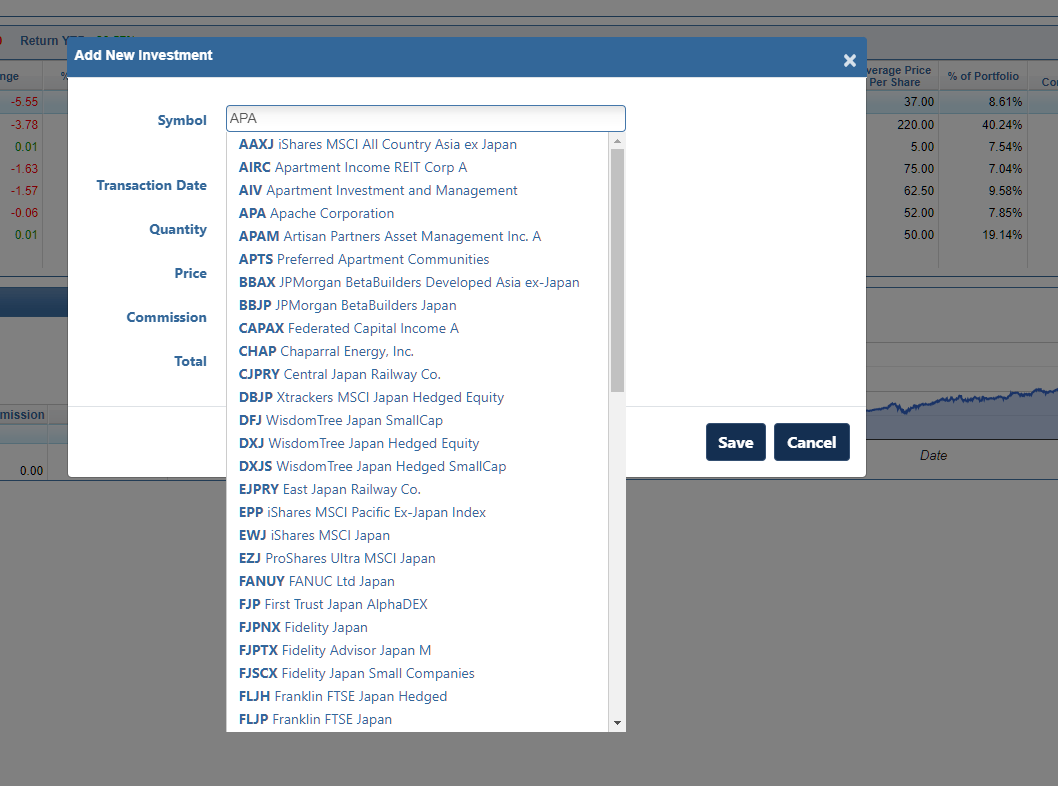
When you click New from the menu and choose New Investment, the Symbol field is now searchable. For example, as seen in the screenshot above, typing “APA” in the symbol field brings up a list of every symbol and investment name that matches that text. Instead of guessing at a ticker or leaving the site to look one up, you can scan the list and find the exact investment you are looking for in a few keystrokes.
To choose a symbol, simply select the line with the investment you want to add to your portfolio, and EquityStat fills in the rest.
What to Do If Your Symbol Is Not Listed
If you already know the symbol and it does not appear in the search results, you can still type it in directly and tab to the next field. EquityStat will check the symbol to confirm it is valid. If the symbol does not match a real investment, you will see an “Invalid Symbol” message so you know to double check it before continuing.
Why This Makes Tracking Your Portfolio Easier
Small friction points, like having to look up a ticker symbol before you can even add an investment, add up over time, especially if you are entering several positions at once. Investment symbol search removes that extra step, so building out your portfolio in EquityStat is quicker whether you are setting up your account for the first time or adding a new position you just purchased.
This feature also works the same way on mobile, so you get a consistent experience whether you are updating your portfolio from a desktop or adding a quick transaction from your phone.