Adding a new stock, ETF, or mutual fund to your portfolio from your phone only takes a few seconds. It used to mean knowing the investment’s exact ticker symbol before you could type it into the mobile app. If you forgot whether a company traded under one symbol or a slightly different one, you were stuck looking it up somewhere else before you could even start. EquityStat’s mobile symbol search fixes that by letting you search by name or symbol right inside the app.
How Symbol Search Works on Mobile
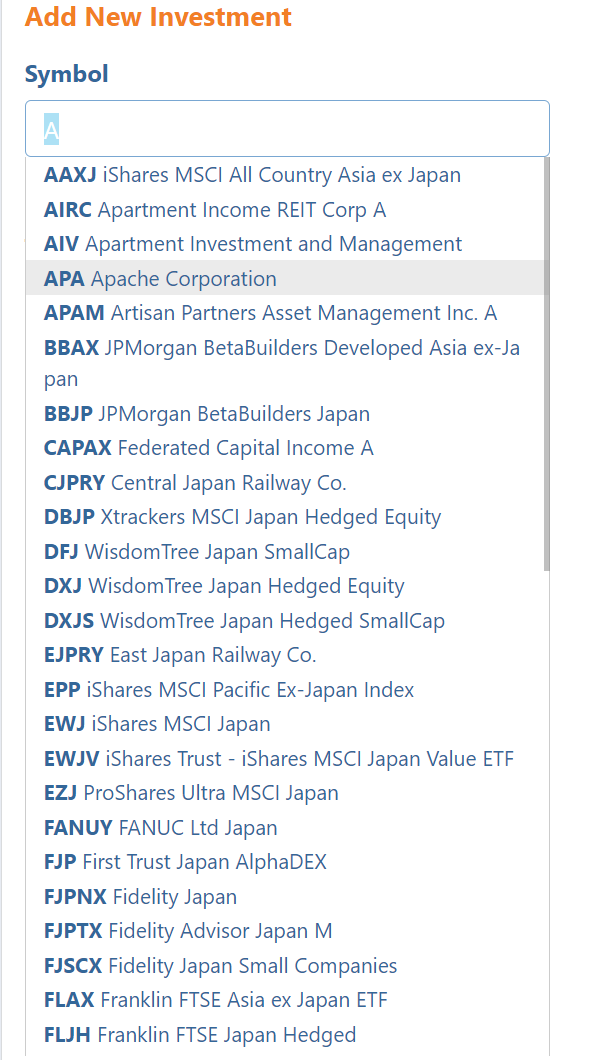
Adding an investment now works the same way on your phone as it already does on desktop. When you are adding a new investment to your portfolio, start typing in the Symbol field. As you type, EquityStat shows you a list of matching symbols and investment names in real time.
For example, type the letter A and you will see every symbol and investment name that matches, all narrowed down as you keep typing. Once you spot the investment you want, tap that line to select it, and the correct symbol is filled in automatically.
What If You Cannot Find Your Symbol
If your investment does not show up in the list, you can still type the symbol in directly and move to the next field. EquityStat will check whether it is a valid symbol. If it is not recognized, you will see an Invalid Symbol message so you know right away, rather than finding out later that your entry did not go through correctly. The Invalid Symbol message will display under the symbol in read. If it is a valid symbol, then the name of the investment will display under the symbol field in green.
Why This Makes Adding Investments Easier
Small friction points add up, and having to leave an app to look up a ticker symbol is exactly the kind of thing that makes portfolio tracking feel like a chore. With symbol search built directly into the mobile add investment screen, you can build out or update your portfolio from your phone just as easily as you can from a computer, whether you remember the exact symbol or just the company name.
Frequently Asked Questions
Do I need to know the exact ticker symbol to add an investment on mobile? No. You can start typing the company name or symbol in the Symbol field, and EquityStat will show you matching results as you type.
What happens if I type a symbol that is not found in the results? You can still type it in directly and move to the next field. EquityStat checks whether it is valid and shows an Invalid Symbol message if it is not recognized. If it is a valid symbol, then a Valid Symbol will be displayed.
Does adding an investment work the same way on mobile and desktop? Yes. The mobile symbol search was built to match the existing desktop experience, so the process feels the same on either device.