Dividends and capital gains distributions land in your brokerage accounts all year long, but they tend to pile up at the end of the year, when mutual funds and ETFs make their final payouts. If you are not keeping track of them as they come in, it is easy to lose sight of how much income your portfolio is actually producing. It is even easier to end up hunting for numbers when tax season arrives.
EquityStat’s stock portfolio tracker makes it simple to record and monitor dividends, short term capital gains, and long term capital gains across every brokerage account you own, all from one screen
Why Tracking Dividends and Capital Gains Matters
Your brokerage’s website will show you dividends and gains for that one account. Most investors, though, hold assets in more than one place. Maybe you have a 401k through work, a taxable brokerage account you manage yourself, and an IRA somewhere else entirely. Look at any single one of those accounts and you are only ever seeing part of the story.
Keeping this information in one place helps in a few ways. You get an honest picture of how much dividend and capital gains income your whole portfolio produced this year, not just what one brokerage happens to report. You also make tax season easier on yourself, since short term and long term gains are taxed differently and it helps to know which is which well before your 1099s show up. And you get a truer read on how your investments are actually performing, since total return includes dividends and distributions, not just the change in share price.
Dividends vs Short Term vs Long Term Capital Gains
It helps to know which category a distribution falls into before you record it.
Dividends are cash payments a company or fund makes to its shareholders, usually out of earnings.
Short term capital gains come from an investment held for one year or less before it is sold. For mutual funds, this can also include short term gains the fund realized internally and passed along to you as a shareholder.
Long term capital gains come from an investment held for more than a year, and they are generally taxed at a lower rate than short term gains.
Mutual funds and ETFs often distribute some combination of all three at year end, which is exactly why it helps to use a tracker that keeps them separated clearly instead of lumping everything together.
How to Record Dividends and Capital Gains in EquityStat
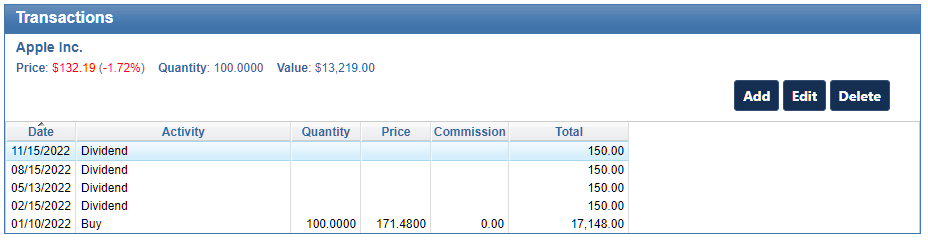
Recording a distribution only takes a minute.
- Select the investment from your portfolio list.
- In the Transaction panel, click Add.
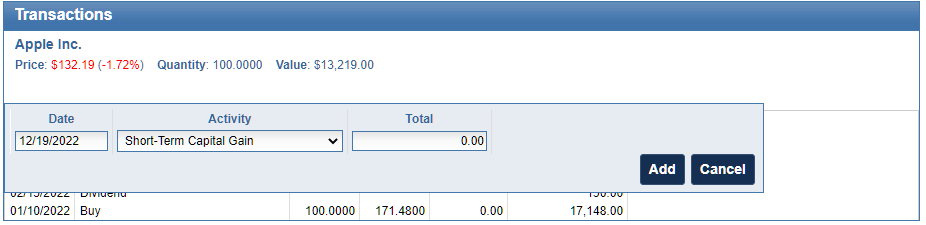
- Use the Activity dropdown to choose the type of distribution. For cash payments, select Dividend, Short Term Capital Gain, or Long Term Capital Gain. If the payout was used to buy more shares instead of being paid out as cash, select the Re Invested version of that same option.
- Enter the details of the distribution and click Add.
Once that is done, the transaction is reflected in your portfolio’s performance, cost basis, and income totals right away.
How to View Your Total Dividend and Capital Gains Income
After you have recorded a few distributions, EquityStat gives you more than one way to see the full picture.
You can customize your portfolio columns by going to the Options menu and selecting Change Columns to add a Total Dividends column, which includes capital gains, directly to your main portfolio view. That way you can see income for each investment without digging through individual transactions.
You can also use the Analyze Portfolio page, found under the Tools menu, which provides graphical performance metrics for your entire account or for individual portfolios. It is a quick way to see income and returns over time without doing the math yourself.
Why This Matters Come Tax Time
When you track dividends and capital gains as they happen throughout the year, you are not stuck rebuilding twelve months of transactions in April. When it is time to file, EquityStat can also help you generate a capital gains report for IRS Form 8949, using the same transaction data you have already entered.
Frequently Asked Questions
Do I need to enter dividends manually in EquityStat? Yes. Dividends and capital gains distributions are entered through the Transaction panel for each investment, using the Activity dropdown to select the correct type of distribution.
What is the difference between short term and long term capital gains? Short term capital gains come from investments held for one year or less. Long term capital gains come from investments held for more than a year and are typically taxed at a lower rate.
Can I see total dividend income across my whole portfolio? Yes. Add the Total Dividends column to your portfolio view, or use the Analyze Portfolio tool for a graphical, account wide breakdown.
Does EquityStat help with tax reporting? Yes. EquityStat can generate a capital gains report formatted for IRS Form 8949 based on the transactions you have recorded.