2024 8949 IRS Tax Form Released

How to Generate Your Capital Gains and Losses Report

If you sold stocks or other investments in 2024, the IRS requires you to report your short‑term and long‑term capital gains and losses using IRS Form 8949. EquityStat now offers a fast, accurate way to generate this form automatically—perfect for tax filing season.

What is IRS Form 8949

IRS Form 8949 is used to report:

  • Short‑term capital gains/losses (assets held 1 year or less)
  • Long‑term capital gains/losses (assets held more than 1 year)

If you sold stocks, ETFs, mutual funds, crypto, or other investments in 2024, you must include this form with your tax return.

Generate the 2024 IRS Form 8949

EquityStat supports automatic creation of the 2023 Form 8949, making tax prep easier and more accurate.

How to Generate Form 8949 in EquityStat

  1. Open the Tools menu.
  2. Select Generate Form 8949.
  3. On the Form 8949 page, click Generate.
  4. EquityStat instantly calculates:
    • Short‑term gains/losses
    • Long‑term gains/losses
  5. A PDF version of IRS Form 8949 is created for download.

This PDF is formatted exactly as required by the IRS.

What You Can Do With the Generated Form 8949

  • Send it directly to your tax preparer
  • Upload it to your tax software
  • Print and include it with your paper tax return

Why Use EquityStat for Form 8949?

  • Accurate capital gains calculations
  • Automatic cost‑basis tracking
  • Fast PDF generation
  • Ideal for active traders and long‑term investors
  • Perfect for 2023 tax filing deadlines

Who Should Generate Form 8949?

You should generate this form if you:

  • Sold stocks in 2023
  • Sold ETFs or mutual funds
  • Sold crypto assets
  • Need a clean, IRS‑ready gains/losses report

If you had any investment sales in 2024, EquityStat’s Form 8949 generator saves time and reduces errors.

Example: IRS Form 8949 Output
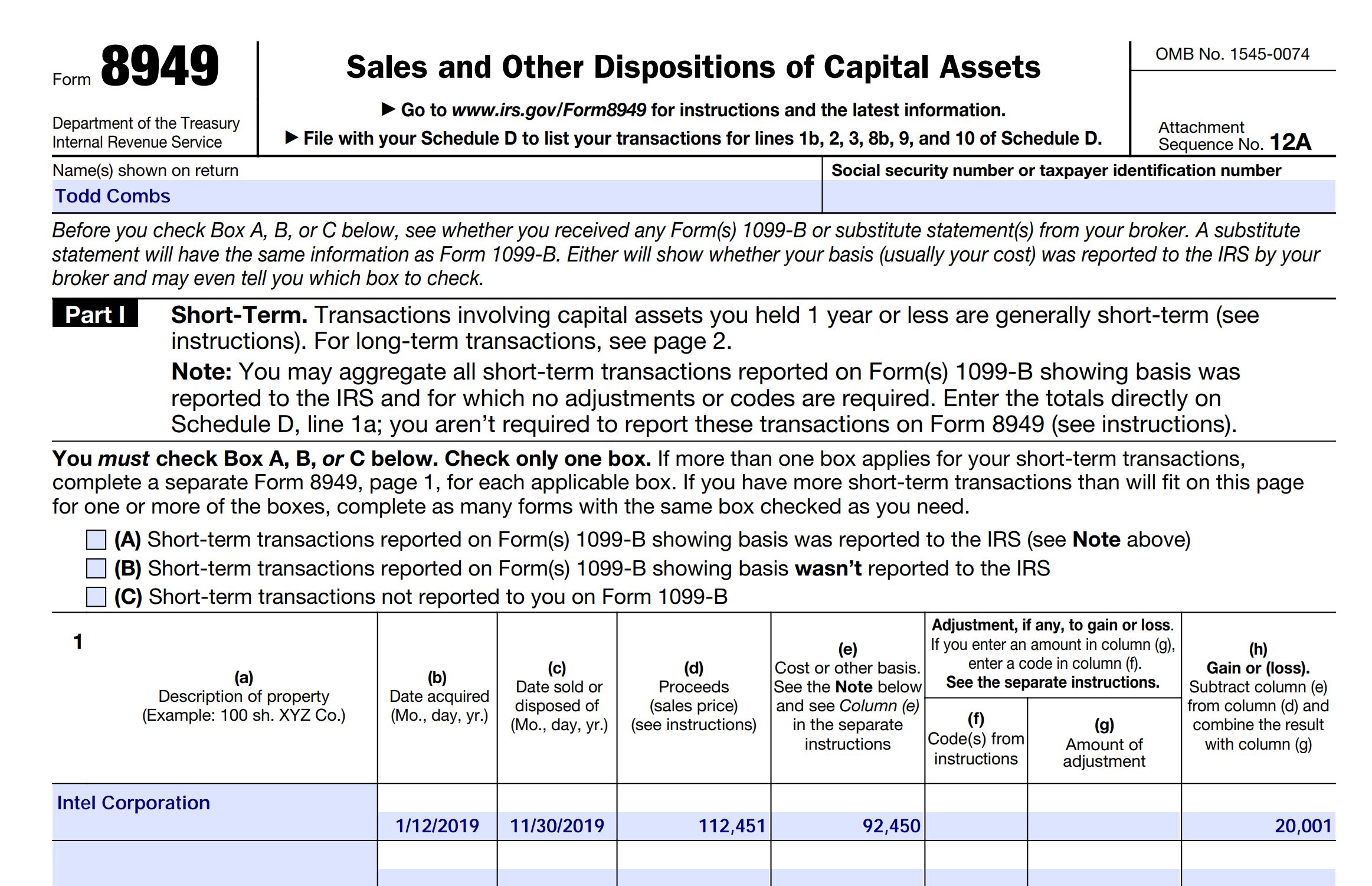
Generate IRS Form 8949 to track your investment gains and losses for your taxes.
Form 8949 Example

Your generated PDF includes:

  • Short‑term transactions (Part I)
  • Long‑term transactions (Part II)
  • Totals for gains and losses
  • IRS‑compliant formatting

This ensures your tax filing is complete and accurate.

Start Your 2024 Form 8949 Now

If you sold investments in 2023 and need to calculate your gains or losses, use EquityStat’s Generate Form 8949 tool today.
EquityStat and Taxes

It’s that dreaded time of year – tax time. EquityStat’s portfolio manager has several tools to help investors with their taxes.

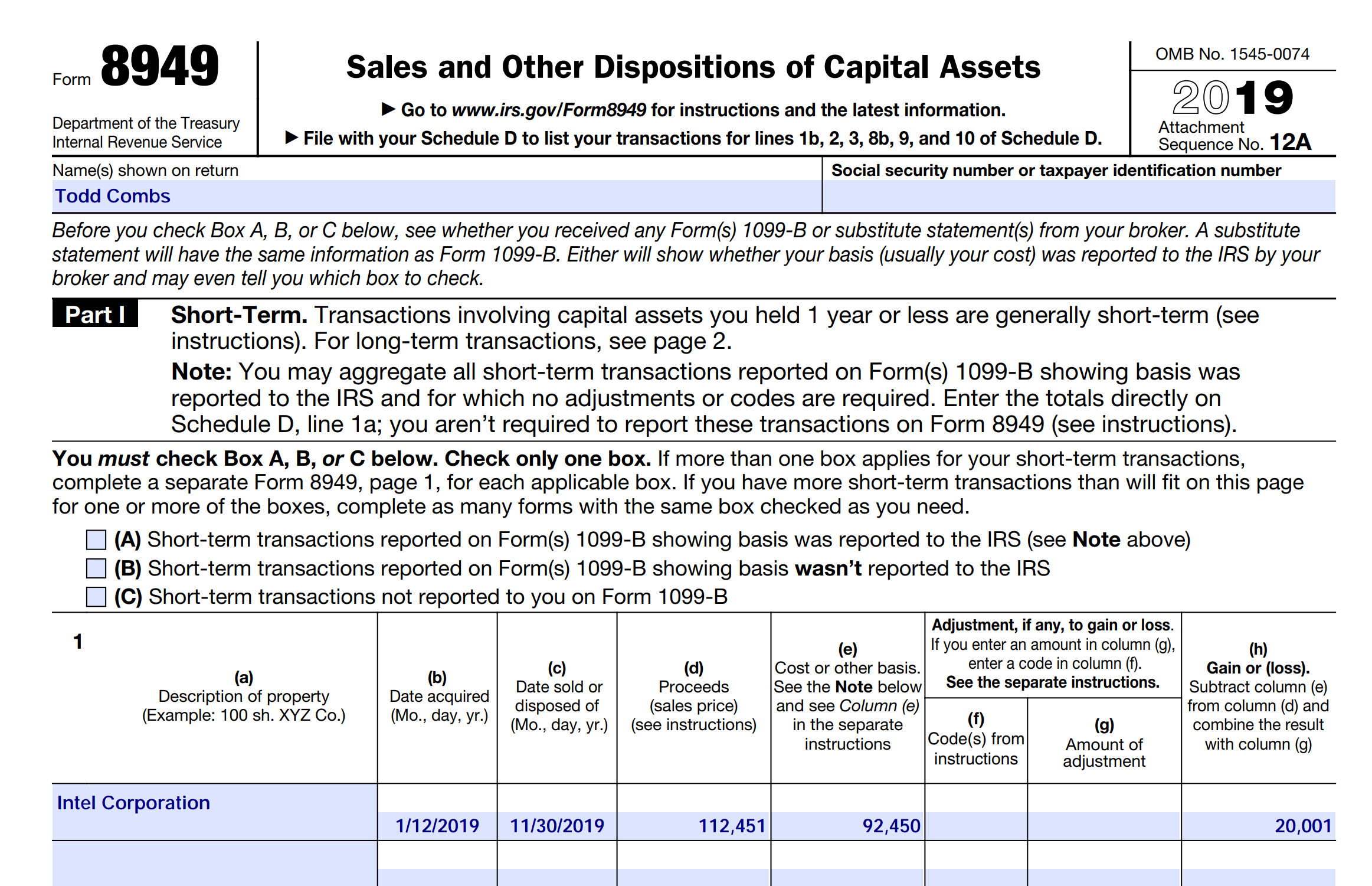
If you sold any shares last year, you can use EquityStat to generate IRS Form 8949.  IRS Form 8949 is a form that shows your short-term  and long-term capital gains on any investment sale.  EquityStat will automatically calculate these capital gains.  It will then generate a PDF of Form 8949 with all needed information that the IRS requires.  You can then give this form to your tax preparer when you are preparing your taxes.  To generate IRS Form 8949, click the Tools menu and then choose the Generate Form 8949 menuitem.

Use EquityStat To Print IRS Form 8949
IRS Form 8949 Example

Another tool to help you with your taxes is the ability to export your investment’s transactions to a spreadsheet. To export your transactions, click the Tools menu and then choose the Export Transactions menuitem. When you export your transactions, you will get a spreadsheet showing each transaction for the investment including the type of transaction it is (e.g. Buy, Sell, Dividend, etc). With this information, your tax preparer can calculate your taxable capital-gains and taxable dividends for all of your investments.

Worst Stock of 2016

According to the Wall Street Journal the worst S&P 500 stock of 2016 was Endo International.  It was down 73%.

You can see the list of worst stocks here:

http://blogs.wsj.com/briefly/2016/12/30/5-worst-performers-in-the-sp-500-in-2016/

How did your investments do in 2016?  What was your worst stock?  If you are not tracking your investment’s performance, consider using EquityStat.  With EquityStat you can track the overall performance of your portfolio/account as well as the performance of each individual investment.  EquityStat tracks the annualized return, year to date return, daily gain, overall gain and many other metrics of your investments.  With these metrics you can easily determine what are your best investments.

Many online brokerages and mutual funds track an individual stock or mutual fund’s performance but you cannot get the overall return of all your stocks or mutual funds.  With EquityStat not only can you get the return each investment, you can also get the return for your entire account.  This way you know how well your investments are performing at any time.

How did your investments perform in 2016?

How did your investments do in 2016?  What was your best stock?  What was your worst?

If you are not tracking your investment’s performance, consider using EquityStat.  With EquityStat you can track the overall performance of your portfolio as well as the performance of each individual investment.  EquityStat tracks the annualized return, daily gain, overall gain and many other metrics of your investments.  With these metrics you can easily determine what are your best investments and what are your worst investments.

EquityStat Financial Portfolio Analysis
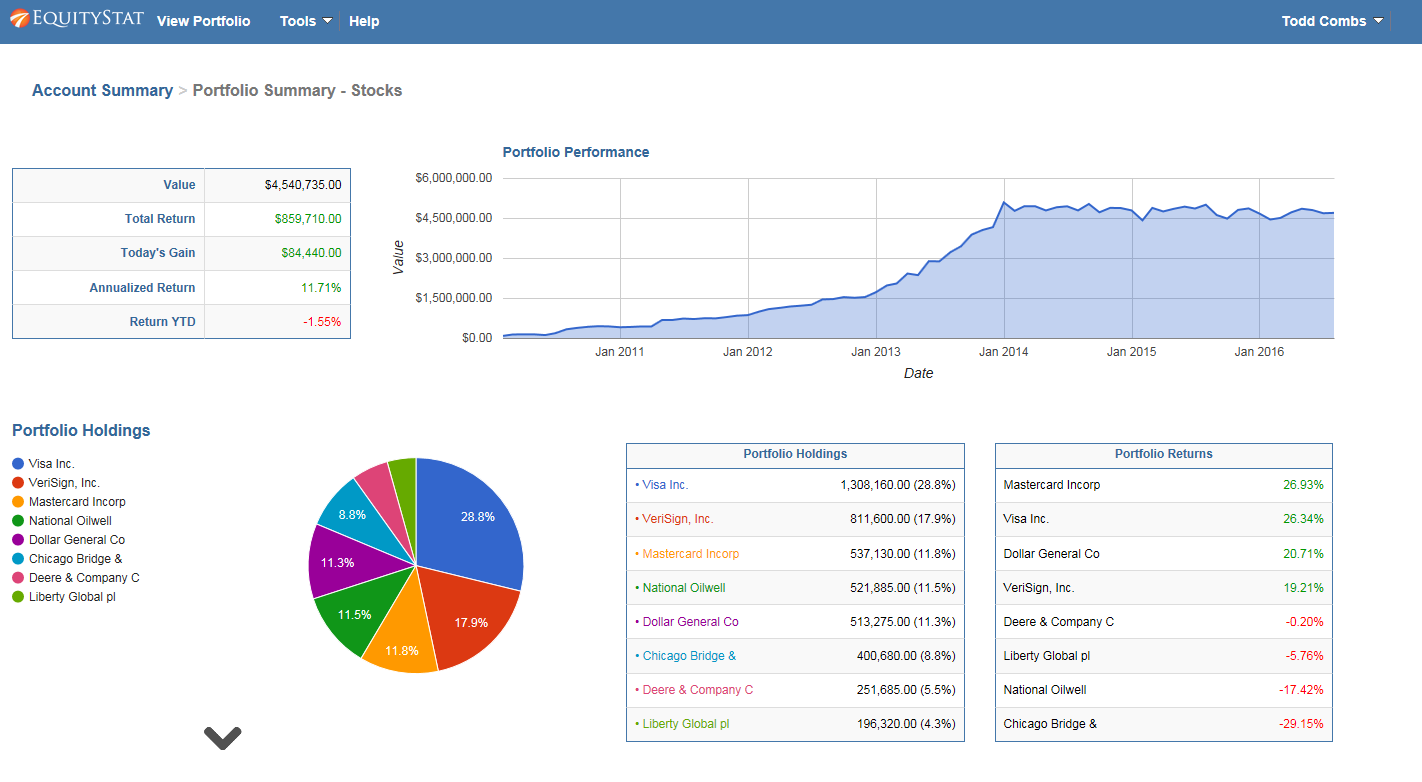
Portfolio Analysis Example

In addition EquityStat provides an analysis of your account and portfolios.  With our account/portfolio analysis you can get a graphical and tableuare view of the performance of your investments.  For example, you can see the performance of your account/portfolio overtime.  Using the account/portfolio analysis you can also see which investments were your best performing investments and which investments were your least performing investments.

Cost Basis

What is Cost Basis?

Investopedia defines cost basis as:

The original value of an asset for tax purposes (usually the purchase price), adjusted for stock splits, dividends and return of capital distributions. This value is used to determine the capital gain, which is equal to the difference between the asset’s cost basis and the current market value. Also known as “tax basis”.

Why is it important?

The IRS is requiring more and more reporting of your cost basis of your investment.  They also require your report the capital gains/losses of your investments. To calculate your capital gains you need to know your cost basis.

How do you calculate it?

On the surface calculating cost basis sounds easy. Just use the price you paid for your stock. For example, if you purchased a 100 shares of XYZ company for $120 then your cost basis is $120. However, things get complicated if you had 3 for 2 stock split. Also, what if you purchase an additional 50 shares for $90? What if you have a split, reinvest capital gains and purchases in a given year? What is your cost basis? Now things get really complicated.

How EquityStat makes things easier

With EquityStat all you have to do is enter your purchases, splits, capital gains and we will calculate your cost basis. Then when you sell your stock whether all of your shares or just some of your shares, we can easily calculate your gain or loss. You can then generate IRS Form 8949 that will show your cost for each investment you sold in the last year.

TurboTax and Investment Taxes

Do you use TurboTax to calculate your investment gains and losses?  Do you use TurboTax to generate form Schedule D or Form 8949?  If so be aware that TurboTax is now charging extra for these features.

In addition to paying $59.99 for the Deluxe version of Turbo tax, if you want to calculate your investment capital gains or losses from stock, mutual fund or ETF sales you will have to pay an additional $20 or $30.

You can read more about the changes to TurboTax here.

http://www.latimes.com/business/hiltzik/la-fi-mh-intuits-catastrophic-turbotax-20150118-column.html

If you are looking for an alternative to TurboTax for calculating your capital gains or losses, checkout EquityStat.  With EquityStat you can generate IRS Form 8949 .  Form 8949 is used to report your short and long term capital gains and loses.  Once you enter your purchases and sales of your investments into EquityStat, you can then generate Form 8949 and use this form to fill out your Schedule D Form.