Many investors today are searching for a reliable alternative for the Yahoo Finance portfolio manager. Over the years, Yahoo Finance has made several changes to its stock tracking tools, changes that have frustrated long‑time users who depend on accurate, fast, and intuitive portfolio tracking. If you’ve been struggling with the Yahoo Finance stock portfolio tracker, you are not alone. Thousands of investors are looking for a better solution.
That’s exactly where EquityStat stands out.
EquityStat was built by investors, for investors. Our goal has always been to create a powerful, clean, and easy‑to‑use portfolio manager that gives you more control, more data, and a better overall experience than Yahoo Finance.
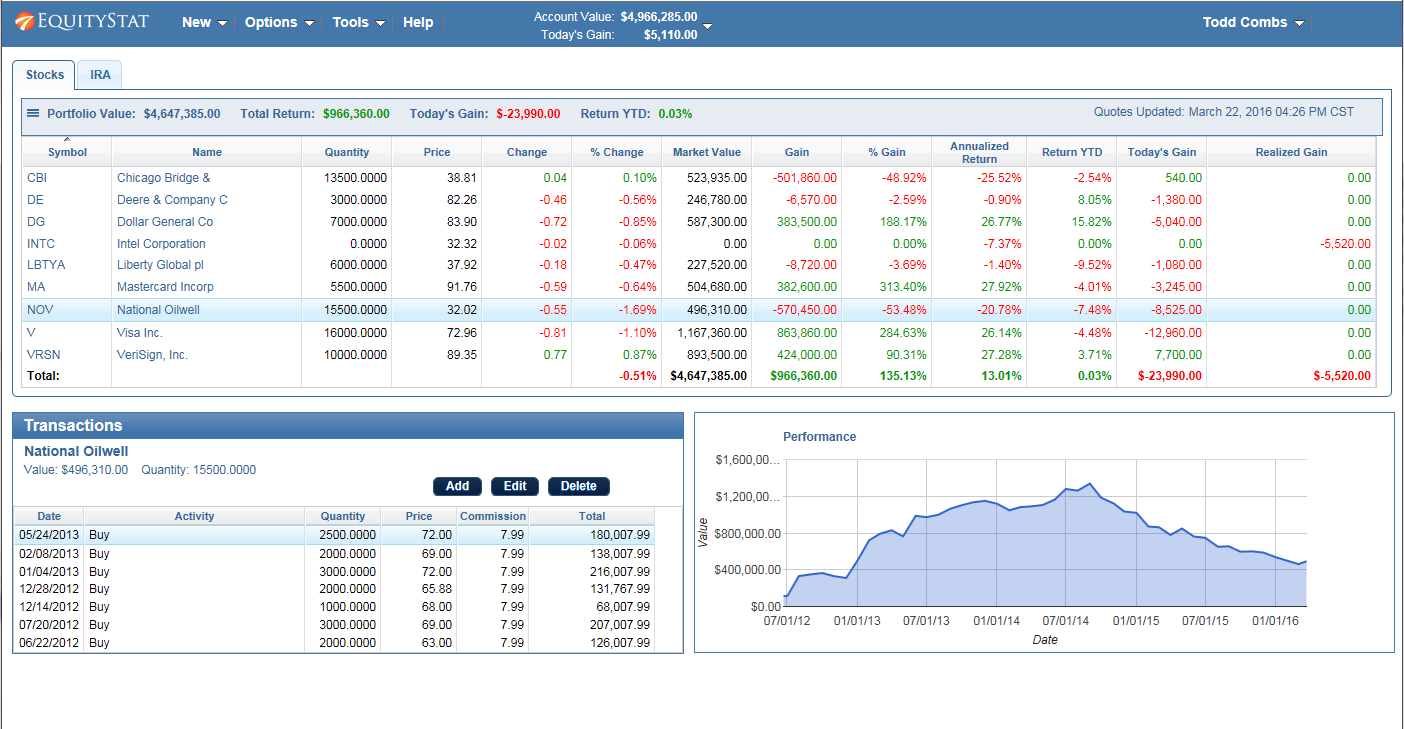
EquityStat was founded by investors. As investors we understand what other investors are looking for in a portfolio manager. For example, one of our goals was to make EquityStat’s Portfolio manager show as much information on your screen without you having to constantly scroll around to see your data. Unlike Yahoo, EquityStat does not show ads, so this gives us more room to show more information about your investments and how they are performing.
Why Investors Are Moving Away from the Yahoo Finance Portfolio Manager
The Yahoo Finance portfolio manager has historically been popular, but recent updates have made the tool less efficient for serious investors. Common complaints include:
- Cluttered screens filled with ads
- Slow loading times
- Missing or removed features
- Limited customization
- Reduced visibility of important data
For investors who track multiple stocks, ETFs, mutual funds, or long‑term positions, these limitations can make daily portfolio management frustrating.
This is why so many users are actively searching for a better Yahoo Finance stock portfolio tracker alternative—and discovering EquityStat.
EquityStat: A Better, Smarter Stock Portfolio Tracker
EquityStat’s portfolio manager was designed to solve the problems investors face with Yahoo Finance. Instead of ads, clutter, and limited data, EquityStat focuses on clarity, speed, and usability.
1. A Clean, Ad‑Free Interface
Unlike the Yahoo Finance portfolio manager, EquityStat does not display ads. This gives you more screen space, faster load times, and a cleaner view of your investments.
2. More Data on Your Screen
One of the biggest complaints about Yahoo Finance is how much scrolling is required to see your full portfolio. EquityStat solves this by displaying more information at once, allowing you to analyze your holdings without constantly moving around the page.
3. Built by Investors Who Understand Your Needs
EquityStat was created by people who actively invest. We know what matters:
- Clear performance metrics
- Easy navigation
- Fast updates
- Accurate data
- Customizable portfolio columns
Every feature is designed to help you make smarter investment decisions.
4. A Better Long‑Term Portfolio Tracking Experience
EquityStat gives you the tools you need to track performance over time, monitor gains and losses, and understand how your investments are performing, without the limitations of the Yahoo Finance stock portfolio tracker.
We Want to Improve Even More — Tell Us What You Need
If there is a feature you liked in the Yahoo Finance portfolio manager that EquityStat does not yet include, we want to hear about it. Our development roadmap is driven by user feedback, and we take every suggestion seriously.
Our mission is simple: Build the best stock portfolio tracker for investors who want accuracy, clarity, and control.
Try EquityStat Today — A Better Alternative to Yahoo Finance
If you’re looking for a powerful, clean, and reliable replacement for the Yahoo Finance stock portfolio tracker, EquityStat is ready for you. Experience a portfolio manager that actually works the way investors need it to.