How to Analyze Your Investment Portfolio in EquityStat
EquityStat has introduced a powerful Portfolio Analysis tool that helps investors evaluate performance, track holdings, and compare returns across multiple portfolios. This feature gives you a clear, data‑driven view of how your investments are performing over time.
What the Portfolio Analysis Tool Does
The Portfolio Analysis page provides a complete performance overview of your account and individual portfolios. You can quickly see:
- Overall account performance over time
- Portfolio‑level performance metrics
- Investment holdings and allocation
- Daily, quarterly, and yearly performance rankings
- Best‑ and worst‑performing investments
This makes it easy to understand which assets are driving your returns and where adjustments may be needed.
How to Access Portfolio Analysis in EquityStat
To run a portfolio analysis:
- Click the Tools menu at the top navigation bar.
- Select Analyze Portfolio from the dropdown.
- The system will generate a detailed analysis of your account and portfolios.
What You’ll See on the Portfolio Analysis Page
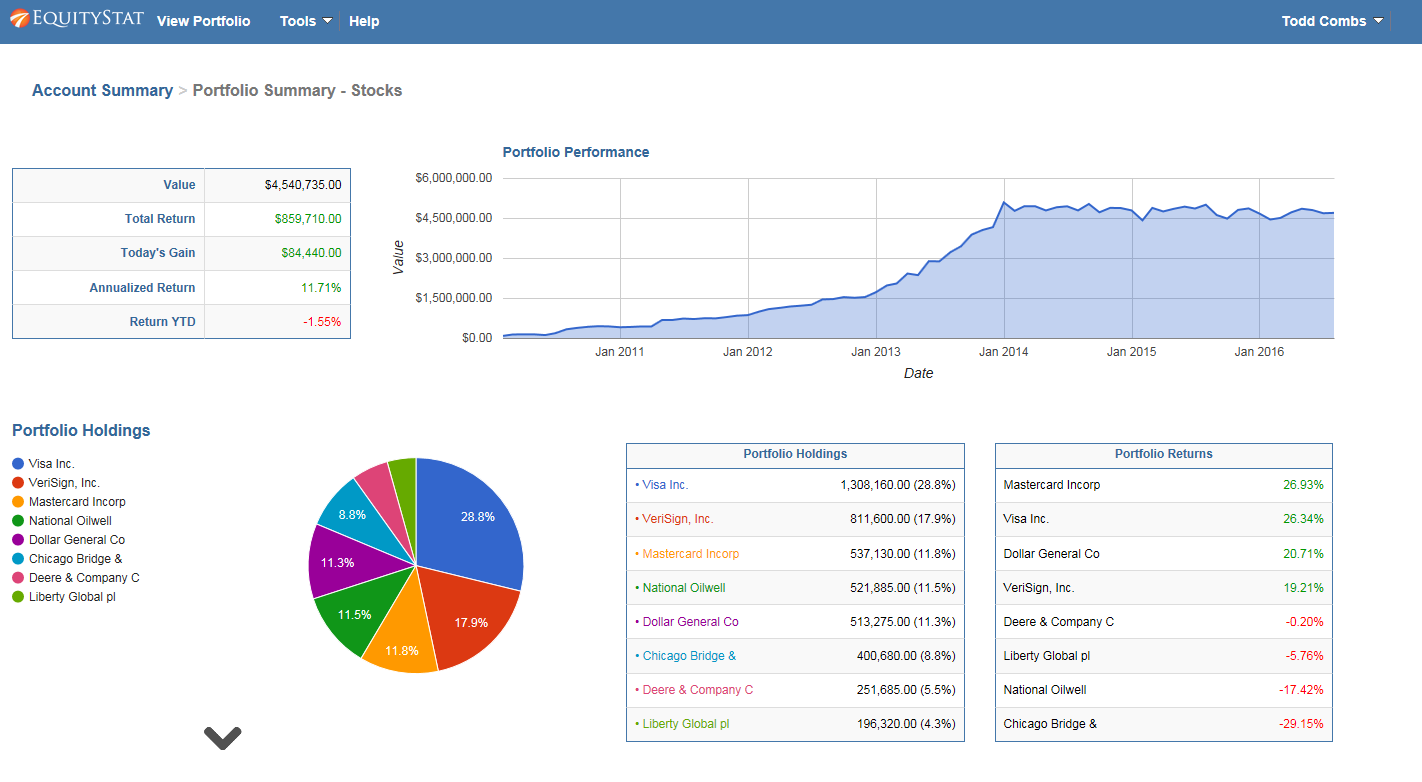
1. Account‑Level Performance Overview
If you manage multiple portfolios, the analysis begins with a full account‑wide performance summary, including:
- A performance graph showing account growth over time
- A breakdown of each portfolio’s performance
- A ranked list of investment returns
- A summary of all holdings across your account
2. Portfolio‑Specific Analysis
Click any portfolio name in the summary table to view:
- Portfolio‑specific performance charts
- Individual investment metrics
- Best and lowest performers for the day, quarter, and year
- A complete holdings list for that portfolio
If you only have one portfolio, the system automatically displays its analysis.
Key Performance Metrics Provided
The analysis includes detailed metrics such as:
- Total return
- Daily return
- Quarterly return
- Year‑to‑date return
- Investment rankings
- Growth charts
These insights help you understand how each investment contributes to your overall performance.
Why This Matters for Investors
Whether you’re a beginner or an experienced investor, having a clear view of your portfolio’s performance is essential. EquityStat’s Portfolio Analysis tool helps you:
- Track long‑term investment growth
- Identify top‑performing investment
- Spot underperforming investments
- Make informed decisions based on real data
- Manage multiple portfolios with ease
- Track dividend income across all portfolios